From SMILES to predictors
Overview of the AQME module
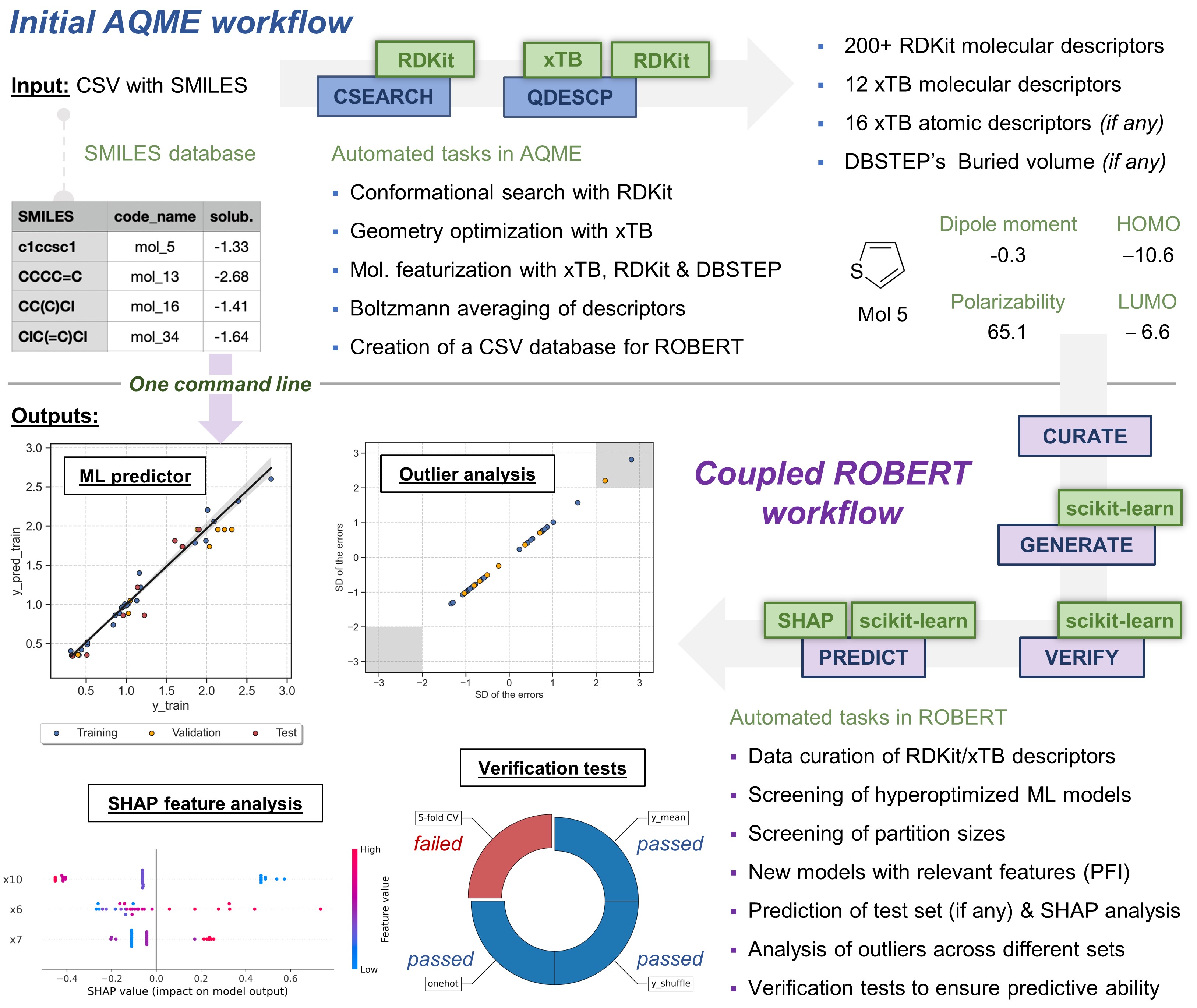
Input required
This module uses a CSV file equivalent to an input of the AQME program. This CSV file must include, at least, these three columns:
code_name
smiles
y_NAME (name of the target y values, i.e., solubility)
All additional variables will be kept during the whole ROBERT workflow. By default, the workflow sets:
--ignore "[code_name,smiles]"(variables ignored in the model)
--names code_name(name of the column containing the names of the datapoints)
Automated protocols
When executing the command line python -m robert --aqme [OPTIONS], ROBERT's AQME module connects to the AQME program to perform an initial CSEARCH-RDKit conformer sampling with the following options:
python -m aqme --csearch --program rdkit --input CSV_NAME.csv --sample 5
Then, the AQME program is run again to generate more than 200 RDKit and xTB Boltzmann-averaged molecular descriptors with QDESCP, using the following options:
python -m aqme --qdescp --files "CSEARCH/*.sdf" --program xtb --csv_name CSV_NAME.csv
A CSV file called AQME-ROBERT_CSV_NAME.csv is created in the folder where the command line was executed. Afterwards, ROBERT uses this new CSV file to start a full workflow.
Example
An example is available in Examples/Full workflow from SMILES.